
Introducing Procedures: AI executes your SOPs reliably
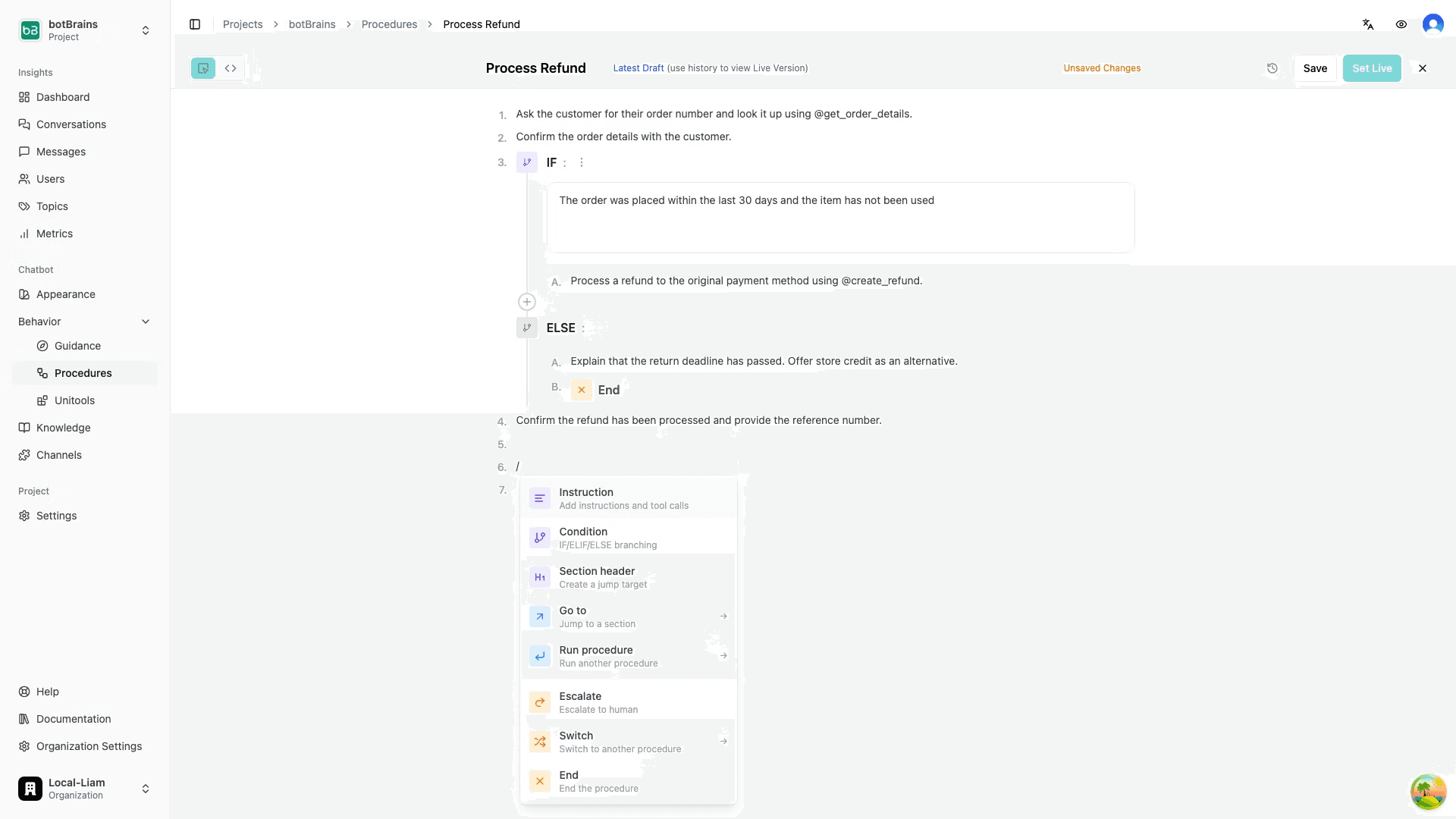
Write process automation like you would write Word documents. Instead of waiting on engineering or budget, your team writes the processes in plain language and AI executes them reliably. Changes are one sentence away. AI works through the process step by step and intelligently solves the task at hand, never skipping steps.

Liam van der Viven
Co-Founder & CTO at botBrains
Can you write? Then you can automate processes.
Today, botBrains launches Procedures. You write step-by-step work instructions and the AI follows them with guaranteed reliability. Instead of building flows or writing code, you describe a process in plain language and the AI executes it exactly as written. Think of them as digital Standard Operating Procedures: structured enough to enforce, flexible enough to handle real conversations.
The key difference from a regular prompt is that Procedures are binding. The AI does not treat them as suggestions. It treats them as constraints it must satisfy before moving on. Every step must be completed, every condition must be met, and no step can be skipped. That is what makes them reliable enough for critical operations like refunds, identity verification, or account changes.
Why we built Procedures
Anyone who has built automations knows the fundamental dilemma. You get either flexibility or reliability, but rarely both.
AI gives you flexibility. A language model understands free-form questions, adapts to context, and handles unexpected phrasing. But it also skips steps, forgets checks, and makes up answers. For critical processes, that is not acceptable.
Code gives you reliability. Decision trees in n8n, Zapier, Make, or custom code guarantee that every step runs in order. But the complexity is high, changes are slow, and only developers understand the system. Every edge case needs its own branch. Every change risks breaking something else.
Procedures combine both. The AI reasons freely within each step, but the structure enforces what must happen and in what order. Conversational flexibility where it helps, guaranteed control where it matters.
How it works
If you have SOPs for your human agents, you already know how to write a Procedure. The same way you would write instructions for a new team member, you write down how the AI should handle a process. The difference is that the AI does not just read the instructions. It executes them.
Here is a simple example. Instead of building a flow with loops and validation logic, you write:
1. Make sure you have the customer's email address, the last four digits of their credit card, and the case number before you continue.
2. Then use @get_current_case_info to retrieve the latest case data.
3. Identify the order the customer is referring to. If it is not clear, ask for clarification.
That is not a flow diagram. It is not code. It is a work instruction. And the AI executes it.
When the AI enters a step that requires three pieces of information, it understands what completion looks like and decides how to proceed based on the conversation:
- If the customer already provided two of the three values in their opening message, the AI asks only for the missing one.
- If none of the values are present, it asks for all three, in a single message or across multiple turns depending on what feels natural.
- If the customer gives an ambiguous answer, the AI asks for clarification.
- If the customer changes the subject mid-step, the AI stays in the step and steers the conversation back.
The critical guarantee: the AI does not advance to the next step until it fully satisfies the current one. It does not skip ahead. It does not approximate. The structure enforces this.
This is the fundamental difference to a traditional flow builder. You do not model every possible path through the conversation. You define the goal of each step, and the AI figures out how to reach it. Fewer branches, less maintenance, and a system that handles real conversations instead of breaking on the first unexpected input.
Fast to write, anyone can author
A process that takes days to model as a decision tree takes minutes to write as a Procedure. Changing a step means editing a sentence. Adding a condition means adding a line. There is no build step, no deployment pipeline, and no risk of breaking unrelated branches, because there are no branches to break.
That speed matters, but so does who can do the writing. Most automation tools create a bottleneck. Support leads, operations managers, and subject matter experts know the processes best, but they cannot build the automations themselves. They write requirements. An engineer translates them. Details get lost.
Procedures remove that bottleneck. The authoring format is plain language. Your support team lead who knows exactly how refund eligibility works can write that logic directly. Your operations manager who understands escalation criteria for VIP customers can define those rules without filing a ticket. The people closest to the process author the automation.
When hard technical checks are needed, code predicates and audience rules are available. But they are the exception, not the baseline.
The building blocks
Procedures use three block types:
Instruction blocks contain natural language directions: what to do, what to say, what actions to take. From "Ask the customer for their order number" to "Use @get_order_details to look up the order and summarize the current status."
Condition blocks add branching. Conditions can evaluate semantically ("Is the customer asking about a return or an exchange?"), via code predicates (a Python check against a return window), or based on audience segments (VIP customers, specific regions).
Jump blocks control flow: escalate to a human, end the Procedure, or run a sub-procedure. Sub-procedures let you build reusable steps like identity verification once and call them from anywhere.
A practical example: refund processing
Here is what a refund Procedure looks like in practice:
1. Run the sub-procedure @verify_customer_identity.
2. Ask the customer which order they want to return and why.
3. Use @get_order_details to retrieve the order data.
4. [Code predicate] Check if the order is within the 30-day return window.
   - If yes: continue to step 5.
   - If no: explain that the return window has passed and offer store credit as an alternative. Then end the procedure.
5. Use @process_refund to initiate the refund.
6. Confirm the refund amount and expected timeline to the customer.
The AI handles the conversation. It collects information naturally, asks follow-up questions when answers are unclear, and stays on track if the customer goes off-topic. The Procedure guarantees policy compliance: the AI verifies identity before anything else, checks eligibility with code (not AI judgment), and only processes the refund if all conditions are met.
Compare this to a flow builder, where you would need separate nodes for each validation state, error handling for missing inputs, loops for re-asking, and branches for every edge case. Here, you describe the process. The AI handles the rest.
How Procedures fit into botBrains
Procedures work across every channel botBrains supports: web chat, email, and Slack. A Procedure that handles a refund works the same whether the customer writes an email or starts a chat.
Combined with Unitools, Procedures gain direct access to your systems. The AI can read from ERPs, CRMs, databases, and internal tools, and write changes back safely. A Procedure does not just talk about processing a refund. It actually processes it.
You can also use code predicates in condition blocks for checks that must not rely on AI judgment, and call Unitools for custom logic, database queries, or API calls. That includes triggering external platforms like n8n, Make.com, or Zapier when you need them as part of a larger process.
Monitoring and iteration
botBrains tracks every Procedure execution. You see completion rates, escalation rates, and error rates on a dashboard. For any conversation, you can inspect the exact path the AI took, which steps it completed, where it branched, and why.
If a step has a high escalation rate, you read the conversations, adjust the instruction, and deploy the change immediately. No retraining, no redeployment, just an updated sentence.
Get started
Procedures change who can build automations, how fast they can be modified, and what is worth automating. Processes that were too complex to model as decision trees become straightforward when you can just write them down.
Read the docs or book a call to see Procedures in action.